A practical, no-fluff guide to automating your business with AI. Where to start, what to automate first, what tools to use, and what to avoid.
Stop Automating Everything at Once
This is the number one mistake we see. A business owner reads about AI, gets excited, and tries to automate five things in the same week. Two months later, nothing works properly, the team is frustrated, and the whole project gets shelved.
AI business automation works best when you treat it like building a house. You start with the foundation, not the roof. One process at a time, done right, will save you more than five processes done halfway.
Here is how to actually do it.
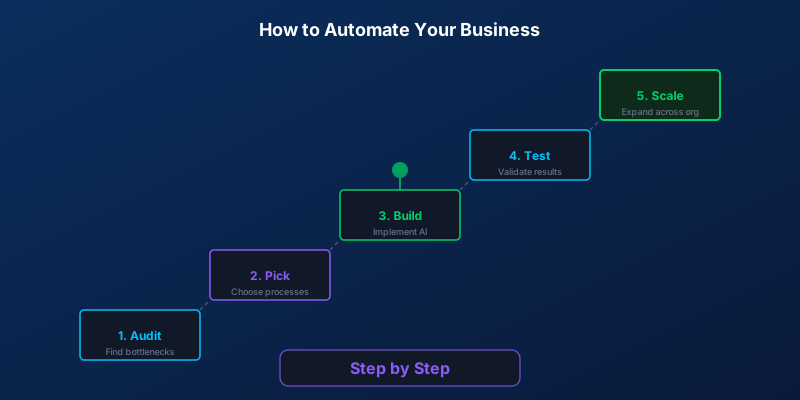
Step 1: Audit Your Time
Before you automate anything, you need to know where your time goes. Not where you think it goes. Where it actually goes.
For one week, track every task you and your team do. Write it down, use a spreadsheet, or use a time-tracking tool like Toggl or Clockify. Be honest about it.
What you are looking for:
- Repetitive tasks that follow the same pattern every time
- High-volume tasks that eat up hours each week
- Tasks that require no creative judgment, just moving information from A to B
- Bottlenecks where things get stuck waiting for someone to respond
Most businesses find that 30 to 40 percent of their weekly hours go to tasks that could be partially or fully automated. That is your opportunity.
Step 2: Pick ONE Process to Automate First
Do not try to be clever here. Pick the one process that scores highest across these three criteria:
- High volume: It happens many times per day or week
- Low complexity: The decision-making is straightforward (if X, then Y)
- Measurable: You can clearly track the before and after
A great first automation is one where you can see results within two weeks, not two months.
The Best First Automations (Ranked by ROI)
Based on what we have seen across hundreds of small and mid-sized businesses, here is where to start:
1. Customer Inquiry Responses
An AI chatbot on your website can handle 60 to 80 percent of incoming questions instantly. Think about how many times your team answers the same questions about pricing, hours, services, or availability. A well-built chatbot handles these 24/7 and routes complex questions to a human.
Typical time saved: 10 to 20 hours per week for a business getting 50+ inquiries daily.
2. Appointment Scheduling
If your business runs on appointments, stop doing it manually. AI scheduling tools can check availability, book slots, send confirmations, and handle rescheduling without anyone on your team touching it.
Typical time saved: 5 to 15 hours per week.
3. Invoice Processing
Extracting data from invoices, matching them to purchase orders, and entering them into your accounting system. AI handles this faster and with fewer errors than manual entry.
Typical time saved: 3 to 10 hours per week.
4. Lead Follow-Up Emails
When someone fills out a form or requests information, the speed of your response matters. AI can send personalized follow-up emails within minutes, not hours. It can also send reminders and nurture sequences automatically.
Typical time saved: 5 to 8 hours per week.
5. Social Media Responses
Responding to DMs, comments, and basic questions on social platforms. An AI assistant can handle routine interactions and flag anything that needs a personal touch.
Typical time saved: 3 to 7 hours per week.
Step 3: Choose Your Approach
You have two main options, and the right choice depends on your budget, technical skills, and how custom your needs are.
DIY with No-Code Tools
Tools like Zapier and Make (formerly Integromat) let you connect apps and build automations without writing code. You can set up things like “when a new form submission comes in, send an email, add to CRM, and notify Slack.”
Best for: Simple, linear workflows between popular apps. Cost: Free to 100 EUR/month for most small businesses. Limitation: They struggle with anything that requires real AI decision-making or custom logic.
Custom-Built Automation
This means working with a developer or agency to build automation tailored to your exact workflow. You get AI that understands your specific business context, integrates with your existing systems, and handles complex scenarios.
Best for: Processes with nuance, multiple decision points, or industry-specific requirements. Cost: 2,000 to 10,000 EUR one-time, depending on complexity. Advantage: It fits your business like a glove instead of forcing you to change how you work.
Step 4: Build, Test, Iterate
Do not aim for perfection on day one. Build a minimum viable automation.
Here is what that looks like:
- Set up the basic flow with the simplest version that works
- Run it alongside your manual process for one to two weeks
- Catch the edge cases where the automation does not handle things correctly
- Refine and improve based on real data, not assumptions
- Only then, turn off the manual process
This approach reduces risk. If the automation makes a mistake, your manual backup catches it. Once you trust the system, you let it run on its own.
Step 5: Measure Results
You need hard numbers. Before you started, you tracked how long the process took manually. Now compare:
- Time saved per week (in hours)
- Response speed (how fast customers get an answer)
- Error rate (mistakes before vs. after)
- Customer satisfaction (are people happier with the faster response?)
- Cost (what you are spending on the automation vs. what you were spending on manual labor)
If the numbers look good, you have your proof of concept. If they do not, adjust before moving on.
Step 6: Scale to the Next Process
Once your first automation is running smoothly (give it at least a month), go back to your time audit and pick the next highest-impact process. Repeat the same steps.
Most businesses can automate three to five core processes within six months. After that, the compound effect kicks in. Your team spends their time on work that actually requires human creativity and judgment, not data entry and copy-pasting.
Real Example: A Plumber Automating Lead Response
Let us walk through a real scenario. Marco runs a plumbing business in Rotterdam with three employees. He gets about 15 to 20 inquiries per day through his website and WhatsApp.
The problem: Marco or his office manager had to read every message, figure out what the customer needed, check the schedule, and reply. This took about three hours per day. Leads that came in after 5 PM did not get a response until the next morning, and by then, many had called a competitor.
The automation: Marco set up an AI chatbot on his website and WhatsApp that:
- Asks the customer what kind of plumbing issue they have
- Collects their address and preferred time slots
- Checks Marco’s calendar for availability
- Books the appointment and sends a confirmation
- Sends Marco a summary of each new booking
The result: Response time dropped from 4 to 6 hours to under 2 minutes. Marco’s office manager now spends one hour per day on customer communication instead of three. He is booking 25 percent more jobs because he is no longer losing after-hours leads.
Total cost: About 4,500 EUR for the setup, plus 80 EUR per month for running costs. The automation paid for itself in six weeks.
Tools Landscape: What to Use When
| Scenario | Tool | Best For |
|---|---|---|
| Simple app-to-app connections | Zapier | Non-technical users, quick setup |
| More complex workflows | Make | Visual workflow building, more flexibility than Zapier |
| Self-hosted, full control | n8n | Technical teams who want no vendor lock-in |
| AI chatbots and voice agents | Custom development | Businesses that need real AI, not just “if-then” rules |
| Full workflow with AI decisions | Custom development | Complex processes with multiple systems |
A simple rule: If your automation is mostly “when X happens, do Y,” use Zapier or Make. If it requires understanding context, making judgments, or handling unstructured data (like reading emails or understanding customer requests), you need custom AI.
Budget Guide: What You Can Do at Every Level
Free (0 EUR/month)
- Zapier free tier (5 automations, 100 tasks/month)
- Google Apps Script for simple Google Workspace automation
- ChatGPT for drafting emails and content (manual, not automated)
100 EUR/month
- Zapier or Make paid plans with more automations
- Basic chatbot using a SaaS platform
- Automated email sequences through Mailchimp or similar
500 EUR/month
- Advanced workflow automation with Make or n8n
- AI chatbot with CRM integration
- Automated reporting and dashboards
2,000+ EUR (one-time)
- Custom AI chatbot tailored to your business
- Full workflow automation connecting your existing systems
- AI voice agent for phone inquiries
- Ongoing optimization and maintenance included
The best approach for most small businesses: start at the 100 EUR/month level to prove the concept, then invest in custom development once you have seen what automation can do for your specific business.
Start Today
You do not need to understand machine learning or write code to automate your business with AI. You need to know your processes, pick the right starting point, and build from there.
Open a spreadsheet right now. List every task you did today. Mark the ones that were repetitive. That is your automation roadmap.
The businesses that win with AI are not the ones that adopt every new tool. They are the ones that automate the right things, in the right order, and actually measure the results.
Writer at SORIX, the AI Automation Studio in Brussels. Building chatbots, voice agents, and automations for businesses across Europe and beyond.