Connect AI automation to HubSpot, Salesforce, Pipedrive, or any CRM. Technical guide with practical integration patterns.
You Do Not Need to Replace Your CRM
The most common misconception about AI automation: you need to switch platforms. You do not. AI works alongside your existing CRM, enhancing it with intelligence and automation. Your team keeps using the tools they know.
Integration Patterns
Pattern 1: AI as Data Input
AI captures leads from chatbots, voice calls, and forms, then pushes enriched data into your CRM automatically.
Flow: Customer interaction > AI processes > CRM updated
Example: A website chatbot qualifies a lead, extracts budget and timeline, then creates a new contact in HubSpot with all fields populated and a lead score assigned.
Pattern 2: AI as Action Trigger
CRM events trigger AI actions.
Flow: CRM status changes > AI takes action
Example: When a deal moves to “proposal sent” in Pipedrive, AI automatically schedules a follow-up reminder and drafts a check-in email for the rep.
Pattern 3: AI as Intelligence Layer
AI analyzes CRM data and provides insights or recommendations.
Flow: CRM data > AI analysis > Recommendations surfaced
Example: AI reviews all deals in pipeline, predicts which are likely to close this month, and flags deals at risk of stalling.
CRM-Specific Integration Methods
HubSpot
- API: Full REST API with excellent documentation
- Workflows: Trigger AI via webhook nodes
- Custom properties: Store AI-generated data (scores, insights)
- Timeline events: Log AI interactions on contact records
Salesforce
- REST/SOAP APIs: Comprehensive but complex
- Flow Builder: Trigger external AI services
- Custom objects: Store AI analysis data
- AppExchange: Pre-built connectors available
Pipedrive
- REST API: Clean and straightforward
- Automations: Webhook triggers for AI
- Custom fields: Store enrichment data
- Activities: Log AI interactions as activities
Zoho CRM
- REST API: Well-documented
- Deluge scripts: Custom automation logic
- Widgets: Embed AI interfaces in CRM views
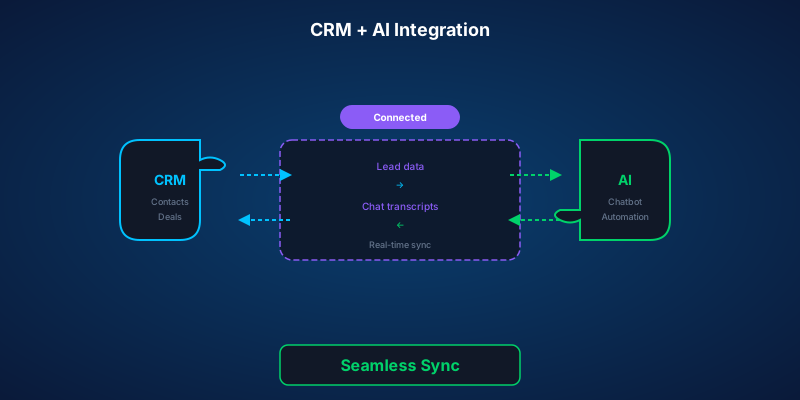
What Data Flows Where
Into CRM (from AI):
- New contacts with enriched data
- Lead scores and qualification status
- Conversation summaries
- Appointment bookings
- Activity logs
Out of CRM (to AI):
- Contact history for personalization
- Deal stage for contextual responses
- Product catalog for recommendations
- Team availability for scheduling
Technical Requirements
- API keys and authentication setup
- Webhook endpoints for real-time sync
- Data mapping (AI fields to CRM fields)
- Error handling and retry logic
- Rate limiting compliance
- Data encryption in transit
Common Challenges
Duplicate contacts: Implement matching logic (email, phone, name) before creating new records.
Data freshness: Decide on sync frequency. Real-time for critical data, hourly for analytics.
Field mapping: Not every CRM field maps cleanly. Plan your data model before building.
API limits: Most CRMs have rate limits. Batch operations where possible.
Implementation Timeline
- Day 1-3: API setup and authentication
- Day 4-7: Data mapping and flow design
- Day 8-12: Build and test integrations
- Day 13-14: Go live with monitoring
Connect AI to your CRM and unlock the full potential of your customer data with intelligent automation.
Writer at SORIX, the AI Automation Studio in Brussels. Building chatbots, voice agents, and automations for businesses across Europe and beyond.